
WakaFree keeps a permanent copy of my coding time. WakaTime already measures it, but its free plan only shows the last week, so I built a tracker that speaks WakaTime's API and saves WakaTime's answer for every day into my own database. Most of the work turned out to be about calendars. Archiving coding time means agreeing with WakaTime on where each day starts and how long it lasts, and a local day can run 23, 24, 25 or more hours.
WakaFree is a coding-time tracker I built on my own and run at wakafree.farhansadeek.com. It has three parts. A VS Code extension sends WakaTime-style heartbeats, a Next.js 15 and Supabase server accepts them on WakaTime's /api/v1 routes and copies WakaTime's daily summaries and timelines into Postgres (one row per day, refreshed every 20 minutes and backfilled over a full year every night), and a FastMCP server exposes the WakaTime API to an LLM client as 15 tools. It's a solo summer project from 2026, and it has one user, me.
Why It Matters
WakaTime is a coding-time tracker. You install a plugin in your editor, and the plugin reports small events called heartbeats while you work. WakaTime's servers turn those heartbeats into time per project, language, editor and machine, and show it on a dashboard [1].
What I wanted was my own copy. The free plan shows one week of dashboard history [2], and although WakaTime keeps everything and opens up the older history if you upgrade [3], I'd still be looking at my own work through someone else's window. I wanted every day in a database I control, charts I choose (timelines segmented six ways, AI coding metrics, per-project detail), and the same data available to an LLM.
So WakaFree does two jobs. It speaks WakaTime's API, so an editor plugin can send heartbeats to it the same way it would to WakaTime. And it archives WakaTime's computed answers every day, so the history piles up in my Postgres instead of scrolling out of a dashboard view.
Technical Details
Heartbeats Are Cheap Facts
A heartbeat is one small record saying "this file was active at this moment". WakaTime's plugin guide says a plugin should send one when the focused file changes, when more than 2 minutes have passed on the same file, and on every save [4], and my extension follows those rules. This is the payload it sends, from the source with comments added.
export interface HeartbeatPayload { |
Heartbeats go out in batches to POST /api/v1/users/current/heartbeats.bulk, with the API key base64-encoded in a Basic Authorization header. That's the request shape WakaTime documents [1], which is why a server that accepts it can take heartbeats from a WakaTime plugin.
Time Comes From the Gaps Between Heartbeats
Since a heartbeat is only a timestamp, time has to come from the spacing between them. Sort the heartbeats, and if two neighbors are closer than a timeout, count the gap as coding time; if they're further apart, you walked away and the gap counts for nothing. WakaTime calls this the keystroke timeout, and its default is 15 minutes [3]. WakaFree's own computation uses the same 15 minutes.
const TIMEOUT_SECONDS = 15 * 60 |
On synthetic data the edges behave as you'd hope. Heartbeats every 2 minutes for an hour, then a 20-minute break, then another hour, make 62 heartbeats and exactly 7,200 seconds, with the break dropped entirely. A gap of 899 seconds counts in full, a gap of exactly 900 counts zero, and a single heartbeat is worth nothing. Because the rule only ever looks at neighbors, a day's total depends entirely on which heartbeats fall inside that day, so the day's boundaries matter as much as the rule.
WakaTime also joins heartbeats into sessions it calls durations, and it can split a day's durations by a field with slice_by (project, language, editor, operating system, machine, category and a few more) [1]. The timelines in WakaFree are built from those.
A Day Is Local, and Its Length Varies
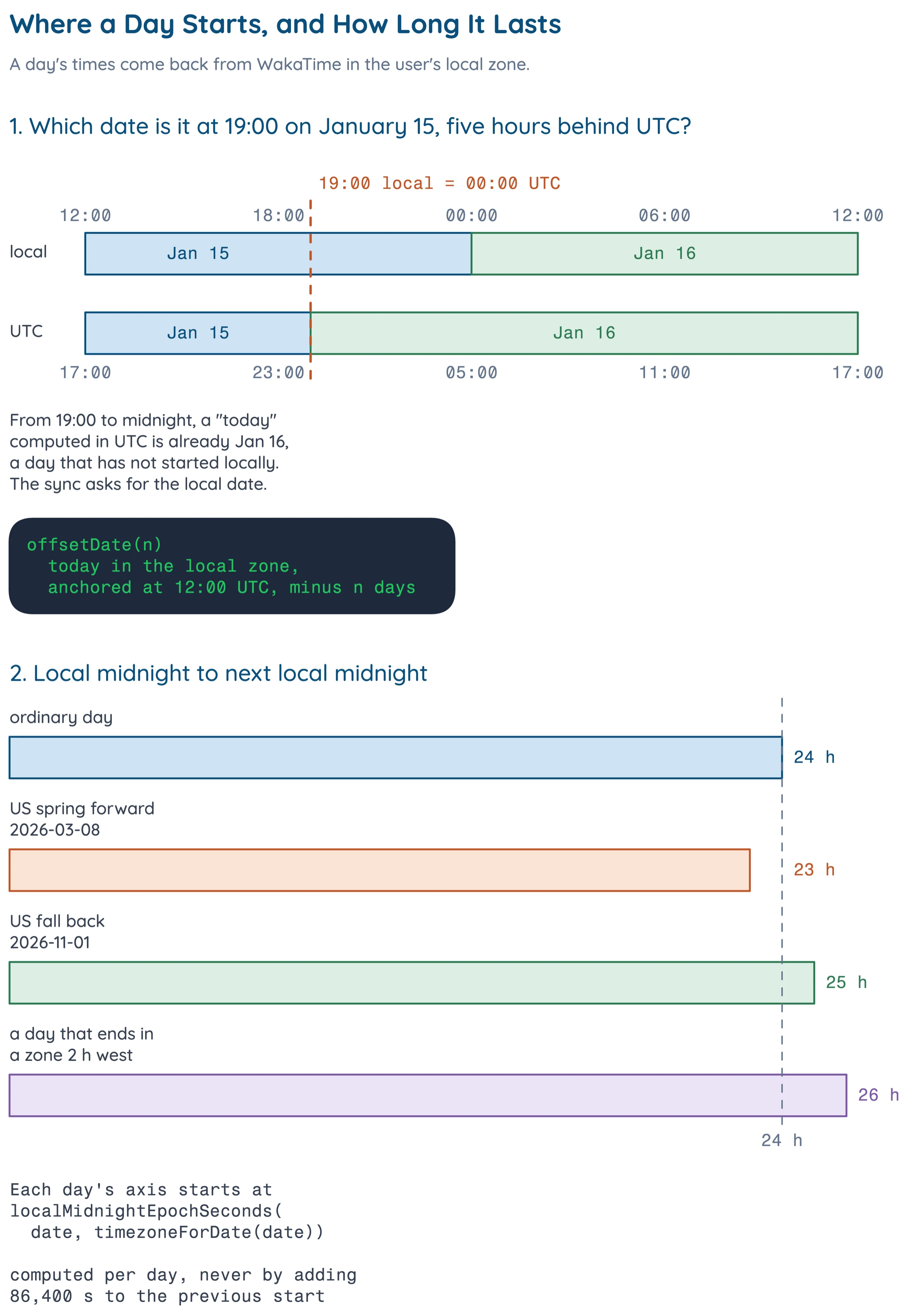
WakaTime's API returns a day's durations and heartbeats from midnight to 11:59 PM in the user's timezone [1]. That sounds like a detail until you write code that asks for "today". Anywhere west of UTC, the UTC date rolls over before local midnight. In a zone five hours behind, 19:00 on January 15 is already January 16 in UTC, so every evening has a five-hour window where UTC is a day ahead.
Days also come in different lengths. Measured from one local midnight to the next with WakaFree's own date helper, an ordinary New York day is 24 hours, the US spring-forward day, 2026-03-08, is 23 hours, and the fall-back day, 2026-11-01, is 25. A day that starts at midnight in one zone and ends at midnight in a zone two hours west is 26 hours, and one that ends two hours east is 22. The start of each day has to be computed on its own, because adding 86,400 seconds to the start of March 8 lands an hour after the real start of March 9.
Architecture
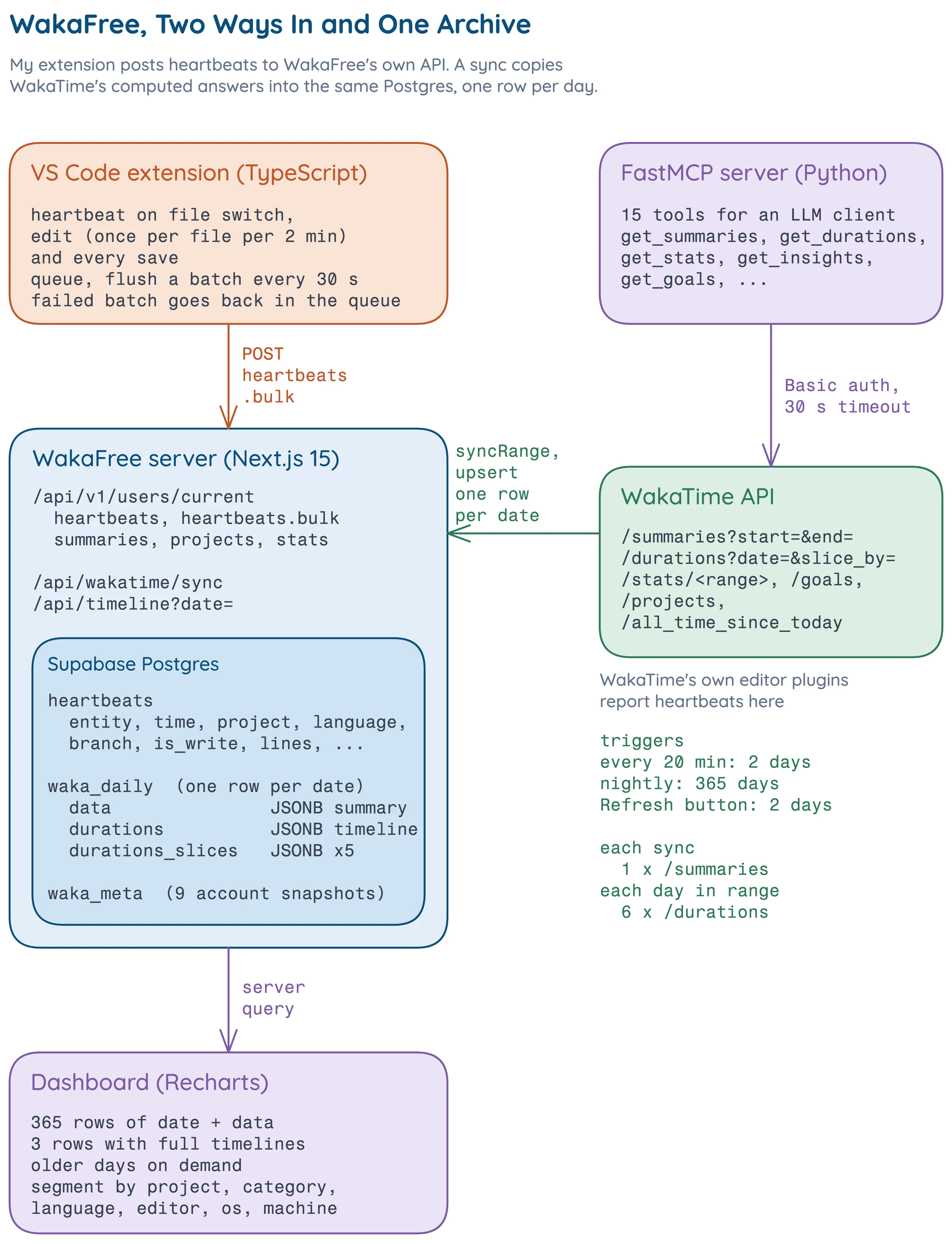
Data comes in two ways. My extension posts heartbeats to WakaFree's own API, which stores them raw, and a sync job reads WakaTime's computed summaries and timelines and upserts them into the same database, one row per date. The dashboard reads the archive, and the MCP server talks to WakaTime's API directly.
Implementation
The Extension
The extension is 318 lines of TypeScript across five files. It hooks three VS Code events [5] (active editor changed, document changed, document saved) and sends one heartbeat for the file that's open when it starts. Each heartbeat gets the workspace folder as its project, the git branch from git branch --show-current with a one-second timeout, and a language name mapped from VS Code's language IDs to WakaTime's names across 30 entries.
Nothing is sent right away. Heartbeats go into a queue that flushes every 30 seconds, and a failed flush puts the batch back at the front.
function needsHeartbeat(filePath: string, isWrite: boolean): boolean { |
Driving the tracker with synthetic edits under a fake clock shows how much the debounce saves.
| Scenario | Heartbeats sent |
|---|---|
| One edit per second on one file for 100 s | 1 |
| One edit per second on one file for 600 s | 5 |
| Five saves in 5 s | 5 |
| Three files, switching every 10 s for 600 s | 15 |
Six hundred keystrokes turn into five heartbeats, while saves always go through because they mark actual writes. That keeps the traffic tiny, since a one-heartbeat batch is 261 bytes, and the retry path holds up too: when a stub server answered with a 500, the same two-heartbeat batch went out again on the next flush. The status bar shows today's total, refreshed every 5 minutes from the server's /summaries, and clicking it opens the dashboard.
Speaking WakaTime's API
The server implements the routes an editor plugin and the status bar need, which are heartbeats, heartbeats.bulk, summaries, projects, stats/[range] and the current user. The bulk route accepts an array or a single object, takes the machine name from the X-Machine-Name header, defaults the category to coding, and inserts the rows into a heartbeats table indexed on (user_id, time). It then replies with a responses list that pairs each stored heartbeat with a 201 status.
const responses = (data ?? []).map((hb) => [ |
Auth accepts either a Basic header with the base64 key, which is what WakaTime plugins send, or a Bearer token.
Archiving One Row per Day
The archive is the center of the project. waka_daily has one row per date, and the whole upstream summary for that day goes in a JSONB column [6] next to every timeline. The schema comment says it plainly, "Nothing is discarded", so projects, languages, editors, dependencies, AI agent costs and the daily average all come along without me picking fields in advance.
A sync is one batched /summaries call for the whole range, then six /durations calls per day, fired in parallel. One is the unsliced timeline, and five are sliced by category, language, editor, OS and machine.
const TIMELINE_SLICES = ['category', 'language', 'editor', 'os', 'machine'] as const |
Every row is upserted on its date [7], so syncing the same day twice just replaces it, and that's what lets the schedules overlap without coordination. A GitHub Actions workflow [8] runs every 20 minutes and refreshes the last 2 days, another runs nightly and refreshes the last 365, and a Vercel cron runs once a day as well. A Refresh button on the dashboard calls a Next.js server action [9] that syncs the last 2 days on the server, so the sync's shared secret never reaches the browser. A sync can also snapshot 9 account-level endpoints (profile, all-time total, goals, projects, machines, user agents and stats for 7 days, 30 days and all time) into a waka_meta table.
With a counting fetch and a stubbed database, syncRange shows what each schedule costs upstream.
| Sync | Requests to WakaTime |
|---|---|
| 2 days, no snapshots (every 20 minutes) | 13 |
| 2 days with snapshots (Refresh button) | 22 |
| 7 days, no snapshots | 43 |
| 365 days with snapshots (nightly) | 2,200 |
The timelines are almost all of it. The count grows by 6 for every day in the range, so the nightly year is 2,190 durations requests, 1 summaries request and 9 snapshots.
Timelines Segmented Six Ways
Because every slice is already in the row, the "Segment By" picker on the timeline is a client-side switch with no extra fetch. The only wrinkle is that each slice names its label field differently (category, language, editor, machine, os or project), so one function reads whichever is present and turns every slice into the same {time, duration, label} block. Older rows that only stored the category slice in its own column still map through the same path.
The dashboard around it has an overview (range total, current day, daily average, most active day), a range picker for 7, 14, 30, 90 and 365 days, a weekday chart, stacked daily charts by project and category, breakdown pies, goals, all-time stats, per-project detail and an AI coding section. That section adds up WakaTime's per-day AI fields, such as AI and human line additions and deletions, input and output tokens, prompts, sessions and per-agent cost. It's drawn with Recharts in a muted Nord-style palette.
Drawing Each Day in Its Own Zone
The timeline's hour axis has to start at the midnight I actually lived through. timezone.ts keeps an ordered list of {from, tz} segments with IANA zone names [10], and timezoneForDate picks the last segment that has started. The IANA rules handle daylight saving, so only travel or a timezone change needs a new line. Local midnight comes from measuring the zone's offset with Intl.DateTimeFormat [11].
export function localMidnightEpochSeconds(dateStr: string, tz: string): number { |
For New York, local midnight on January 15 comes out 5 hours after UTC midnight and on July 15 only 4 hours after, so summer time shows up without any special case.
The MCP Server
The third part is a 282-line Python server built on FastMCP [12], which speaks the Model Context Protocol [13]. It wraps WakaTime's API as 15 tools, covering the current user, all-time stats, today's status bar, stats by range, summaries, durations with slice_by, heartbeats for a date, projects, commits per project, goals, insights, leaderboards, machine names, editors and languages. That puts the same data in front of an LLM client, which can look up a day's work through a tool like get_durations.
Problems
1. Asking WakaTime for the Right Day
The first version of the sync computed "today" and "yesterday" as UTC dates. Every evening, once UTC had rolled over, the frequent sync asked WakaTime for a date that hadn't started locally, got an empty day back and stored it, and the dashboard showed that empty day as today. Every date the sync asks for has to be a local date, because that's the only kind of day WakaTime answers for.
The fix was to do date math in the local zone. offsetDate takes today's date in the zone I'm in, then anchors it at 12:00 UTC before subtracting whole days.
const [y, m, d] = currentLocalDate().split('-').map(Number) |
Noon keeps the timestamp far from either midnight, so stepping back whole days always lands on the intended calendar date. The dashboard now reads the row for today's local date instead of the newest row, ignores any row dated after today, and picks Most Active as the day with the largest tracked total. The once-a-day Vercel cron was also rescheduled to run after the local day has rolled over.
2. Drawing a Day Across a Timezone Change
A single fixed zone draws every day in the wrong place once you travel. Each day needs the zone you were in that day, and its axis has to start at that zone's midnight. That's why the schedule is per date and why each day's start is computed on its own. Adding 86,400 seconds to the previous start would be off by an hour after each DST change, and by the full offset difference after moving between zones.
3. A Year of Timelines on Every Page Load
The dashboard first loaded all 365 rows with every column, including the heavy JSONB timelines, even though only the latest days need a timeline when the page opens. Now the page runs three queries in parallel, for the slim date, data columns of up to 365 rows, the account snapshots, and the full timeline columns for just the last 3 rows. Moving the timeline to an older date fetches that one day from /api/timeline?date=.
What I Would Change
More Editors
WakaTime's heartbeat rules fit in a paragraph, and WakaFree already accepts the bulk format a WakaTime plugin sends. A JetBrains or Neovim plugin would be a small project, and it would make WakaFree's own heartbeat data cover all of my editing instead of only VS Code.
References
- WakaTime. API Docs. WakaTime developer documentation. link
- WakaTime. Pricing. link
- WakaTime. FAQ. link
- WakaTime. Creating a Plugin. WakaTime help. link
- Microsoft. VS Code API. Visual Studio Code extension documentation. link
- PostgreSQL Global Development Group. JSON Types. PostgreSQL documentation. link
- Supabase. Upsert data. Supabase JavaScript reference. link
- GitHub. Events that trigger workflows. GitHub Actions documentation. link
- Vercel. Updating Data. Next.js documentation. link
- IANA. Time Zone Database. link
- MDN. Intl.DateTimeFormat.prototype.formatToParts(). MDN Web Docs. link
- Model Context Protocol. MCP Python SDK. GitHub repository. link
- Model Context Protocol. Introduction. link