
A prescription is a piece of paper and a promise. Nobody can tell whether the pill actually came out of the bottle. At the Make2025 hackathon, Jalen Francis and I built PillifyAI in about 19.5 hours to close that loop. A doctor prescribes in a mobile app. A server turns the prescription into scheduled dose records. A dispenser asks the server what's due, releases the dose, and reports back, so the patient's history can tell a dose the device confirmed from one the patient only claimed.
What made it work is one decision. A dose is a single row, and every part of the system reads and writes that row. The app, the server and the dispenser never talk to each other directly, and the row keeps "the patient says they took it" separate from "the device says it released it". Under the hood there's an Expo and React Native app, a Node, Express and Postgres server, an ESP32 that polls the server every 30 seconds, and Raspberry Pi scripts that drive a hacked SG90 servo and a piezo buzzer.
Why It Matters
I wanted the prescription to become data, the schedule to become rows, and the pill to come out of a box that tells the server it did.
For one hackathon, the scope came down to three things:
- A mobile app where a doctor can add patients and prescribe, and a patient can see today's medications and their history.
- A server that owns the schedule and the truth about each dose.
- A dispenser that asks the server what's due and answers with what it did.
This was a hackathon build, not a clinical product. The point was to get the loop working across a phone, a server and a microcontroller in one overnight session at the end of March 2025. The app came to about 5,954 lines of TypeScript and JavaScript, the server about 3,364 lines of JavaScript, the ESP32 sketch 307 lines, and the Pi scripts 383 lines of Python.
Technical Details
One Record as the Shared Truth
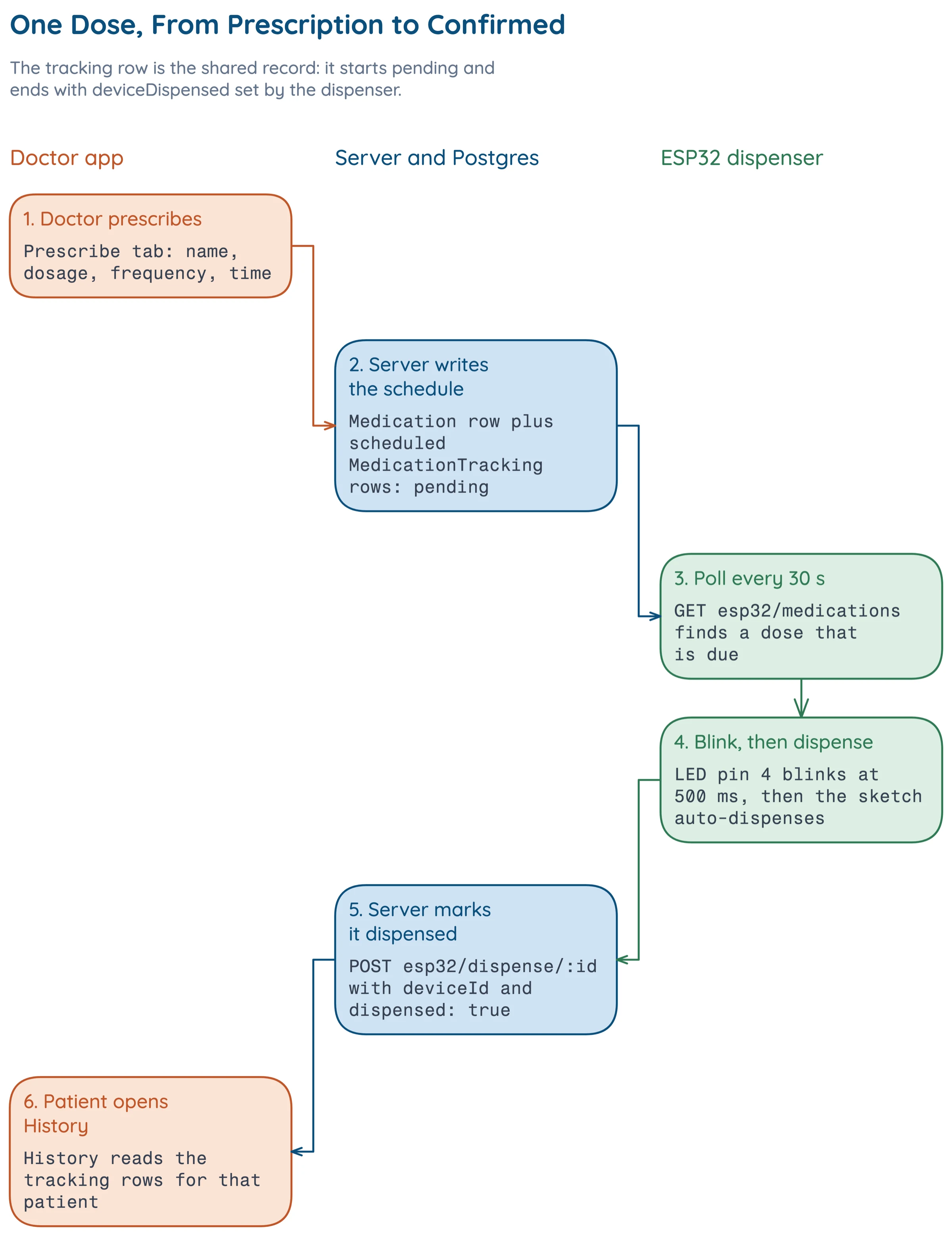
The whole design comes down to one idea, and it lives in the dose row. The doctor's prescription creates that row as pending, the dispenser's report marks it dispensed, and the patient's history reads it. Since the state lives only in that row, the three clients never need to coordinate, and each one can be built and tested against the server alone. With two people and one night, that mattered.
The MedicationTracking model has exactly the fields that idea needs. Condensed from the source, with layout and some allowNull options trimmed:
scheduledFor: { type: DataTypes.DATE, allowNull: false }, |
The split between status and deviceDispensed is the design choice I care about most. A patient can mark a dose taken in the app, and the dispenser can separately report that it released one. Because they're separate fields, the history can tell a claim apart from a confirmation.
Polling Instead of Pushing
A microcontroller on home WiFi is hard to reach from outside, so the dispenser asks the server instead of waiting to be told. Polling on an interval is the simplest design that works under that constraint, and it fits the request-response REST style the server already speaks [1]. The cost is latency, and the interval sets the limit. With a 30 second poll, a due dose waits at most 30 seconds before the dispenser notices. A pill scheduled for a given minute can wait that long, and the behavior is easy to reason about.
Hobby Servos and Pulse Width
A standard hobby servo expects a pulse every 20 ms (50 Hz), and the width of that pulse, usually 1 to 2 ms, sets the shaft angle [2]. A servo modified to rotate continuously reads the same pulse as a speed and direction around a neutral width instead. We hacked an SG90, and our code drives it by speed, so the further the duty is from neutral, the faster it turns.
At 50 Hz the period is 20 ms, so you get the pulse width by multiplying the duty cycle by the period: 2.5 percent is 0.50 ms, 7.5 percent is 1.50 ms and 12.5 percent is 2.50 ms.
Auth Lives in Firebase, Roles Live in Postgres
Firebase handles credentials. The server keeps its own user, doctor and patient tables. It depends on firebase-admin, whose usual job is verifying Firebase ID tokens [3], and it mirrors users into Postgres, where the doctor and patient roles are stored and joined to prescriptions. That's why the auth routes are mostly about keeping users in sync rather than logging them in.
Architecture
The system is three clients around one server and one database.
The mobile app and the server talk over REST. The app's service layer covers today's medications, history, updating a taken status, and prescribing. The server mounts four route groups under /api (auth, patients, medications and devices). The device routes are the dispenser's entire interface: a ping, a listing of patients and medications, and a POST that marks a dose dispensed, sent with an X-API-Key header.
There are two pieces of hardware code. The ESP32 sketch handles the network side. The Raspberry Pi scripts handle the mechanical side, driving the servo and the buzzer.
One dose moves through the system like this.
Implementation
Roles in the App
At registration a user picks a role, and patient is the default. The tab layout shows the Patients and Prescribe tabs only when the signed-in user is a doctor, so a patient sees Home, History and Account and a doctor sees five tabs. There are also login, register and patient/[id] screens, routed with expo-router [4].
An Offline Queue
A phone isn't always online, and a doctor adding a patient in a clinic corridor shouldn't lose the entry. The app keeps a list of pending operations in AsyncStorage under offlineOperationsQueue and replays them in order once the connection test passes. Condensed from the source, with the try/catch, the connectivity test, logging and the empty-queue return trimmed:
const queue = await AsyncStorage.getItem('offlineOperationsQueue'); |
The queue replays in order and is cleared once the loop finishes.
The Prescribe Handler
Prescribing is the largest handler in the server, about 230 lines. It has to create a Medication and generate the scheduled tracking rows from the frequency enum (daily, twice_daily, three_times_daily, weekly, as_needed). This is the handler that turns a prescription into rows. The other medication routes are short: GET /today/:userId, GET /history/:userId and PUT /status/:id.
The ESP32 Loop
The ESP32 sketch connects to WiFi with retries, pings the server, then polls every 30 seconds (CHECK_INTERVAL = 30000). It parses JSON with ArduinoJson [5] on the Arduino core for the ESP32 [6], uses a 10 second HTTP timeout, and shares one request helper between calls. Three LEDs show state, with pin 2 for connected, pin 4 for dispensing and pin 5 for an error. When a dose is due, the dispensing LED blinks and the sketch dispenses on its own.
void handleMedicationDue() { |
dispenseMedication holds for a second, reports the dispense to the server, and clears its state. The sketch also has a remoteDispense(trackingId) function for a dispense the server triggers.
The Servo Class on the Pi
The Raspberry Pi scripts use RPi.GPIO [7]. A ServoControl class starts 50 Hz PWM on GPIO 2 (physical pin 3) at the neutral duty and gives three ways to move, set_direction, set_speed and gradual_move. Condensed from the source, with comments changed or trimmed and the else branch and the rest of set_speed cut:
MIN_DUTY = 2.5 # fully counterclockwise |
Speed is a percentage of the distance from neutral to the end of the range, in whichever direction the servo is already turning. Around the class sit a few small scripts for slow counterclockwise motion and a command-line menu for driving the servo by hand.
The Buzzer
buzzer.py drives a piezo buzzer on GPIO 18 through PWM, starting at 1 kHz. It has a dictionary from note names to frequencies and a play_note(note, duration) function, and it plays Für Elise.
Problems
1. Two Systems Holding One Identity
Firebase knows who a user is. Postgres knows their role and their patients. The two have to agree, and most of the auth code exists to keep them in step. The auth routes handle registration, syncing a Firebase user into Postgres (sync-firebase-user), checking whether a user exists, looking one up by email, updating a role, and making sure a doctor record exists (ensure-doctor-record). Splitting it this way let Firebase own credentials while every prescription could still join against a real doctor and patient row.
2. Figuring Out What the Hacked Servo Does
The duty constants follow the angle convention of a normal servo, but on the hacked SG90 they set speed. Getting a modified servo to move slowly and predictably took a few rounds. We started with sample motor code, tuned the speed, and then added a slow-movement script. gradual_move smooths transitions and controls effective speed, with 10 steps by default and a 50 ms delay between them. The class ended up shaped around what the hacked servo actually does rather than what the datasheet angles say.
Results
Where the Lines Went
Most of the build went into software around a small amount of hardware code. The app is the largest part at 5,954 lines and the server is 3,364. The hardware is small: 383 lines of Pi scripts and a 307-line ESP32 sketch. The server has 10 handlers in auth.js, 6 in medications.js and 4 in patients.js, plus the device routes.
Servo Pulse Widths
The three duty constants correspond to pulse widths of 0.50 ms, 1.50 ms and 2.50 ms at a 20 ms period. Hobby servos commonly use 1.50 ms as the neutral point and about 1 to 2 ms as the typical range [2], so the 0.50 and 2.50 ms endpoints are the extreme ends of what the code asks for. For a continuous-rotation servo, neutral means stopped.
The Melody
The Für Elise note list has 40 entries, 35 notes and 5 rests, and runs 9.2 seconds of nominal duration, or 13.2 seconds counting the 0.1 second default gap after each entry.
What I Would Change
Dosing Logic Beyond a Frequency Enum
The schedule comes from five frequencies, from daily to as_needed. A real product would need actual dosing logic and interaction checking before a dose row is ever written. That was out of scope for one night, and it's the first thing I'd add.
Add Push
The sketch already has a remoteDispense function. A path where the server triggers the dispense would remove the up-to-30-second wait, though it needs a connection the home network allows.
References
- Roy T. Fielding. Architectural Styles and the Design of Network-based Software Architectures. Doctoral dissertation, University of California, Irvine, 2000. link
- Wikipedia. Servo control. link
- Google. Verify ID tokens. Firebase Authentication documentation. link
- Expo. Introduction to Expo Router. Expo documentation. link
- Benoit Blanchon. ArduinoJson. Library documentation. link
- Espressif Systems. Arduino core for the ESP32. GitHub repository. link
- Ben Croston. RPi.GPIO. Python Package Index. link